Capture snags and make the PDF on site

Beste snagging-apps

Als je Beste snagging-apps vergelijkt, begin dan met de basis: De beste opties verlagen de administratieve last op locatie in plaats van het werk terug in een spreadsheet te duwen.

Snel antwoord

Wat is de beste snagging-app?

De beste snagging-app legt elk gebrek met foto's, locatie en onderaannemer vast tijdens één rondgang en maakt een deelbare PDF waar de bouwer mee aan de slag kan. Punch List & Site Audit werkt offline op iOS en is speciaal gebouwd voor nieuwbouw-snagging, woningopleveringen en inspecties vóór de oplevering.

Meer informatie: wat er op een snag list hoort.

01

Wat teams nodig hebben van Beste snagging-apps

Opleveringsteams hebben een eenvoudige manier nodig om gebreken vast te leggen, herstel te volgen en oplevering te bevestigen.

De beste opties verlagen de administratieve last op locatie in plaats van het werk terug in een spreadsheet te duwen.

02

Hoe Punch List & Site Audit in de workflow past

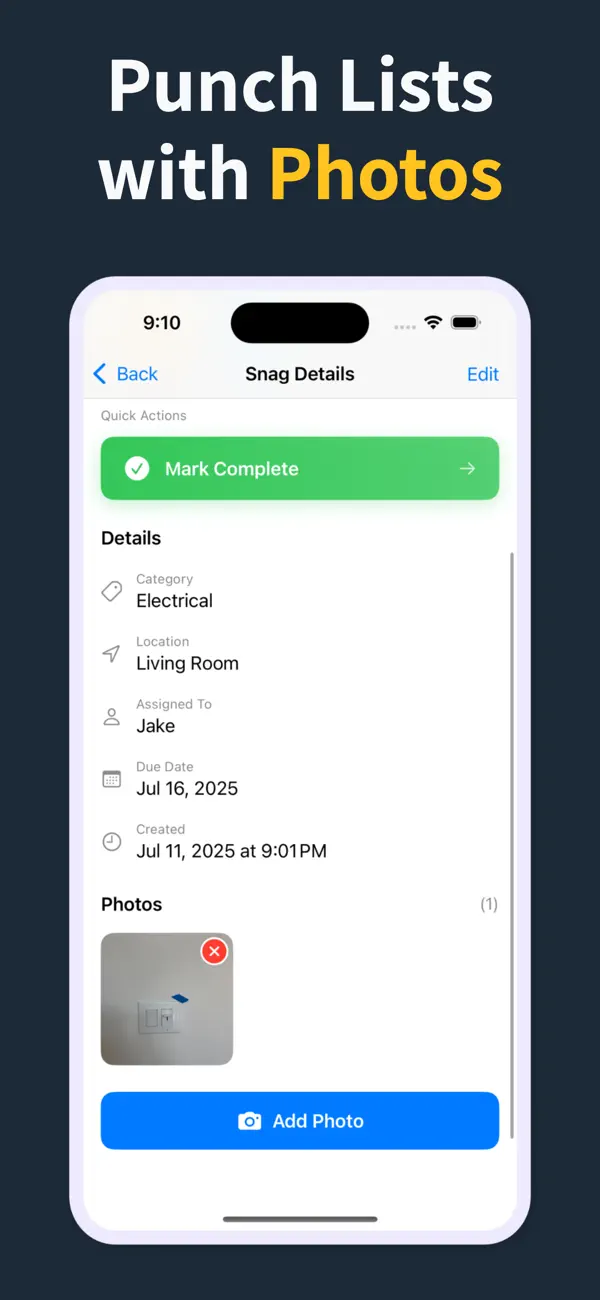
Elk gebrek kan locatie, vakgebied, status, deadline, notities en fotobewijs in één registratie samenvoegen.

Dat houdt opleveringen consistent en maakt het PDF-rapport aan het eind van het bezoek snel.

03

Waarom teams de app op de bouwplaats houden

In plaats van papieren notities of statische spreadsheets blijft de hele gebrekenlijst live op locatie en eenvoudig te delen.

Aannemers, adviseurs en eigenaren bekijken hetzelfde gestructureerde dossier van eerste rondgang tot definitieve oplevering.

How it works

From walkthrough to report in three steps

Punch List & Site Audit keeps capture, assignment, review, and handoff in one iPhone workflow.

1

Create the project

Start a site, client, or renovation project and keep each job separated with progress counts and search.

2

Capture every snag on site

Add title, notes, location, photos, status, priority, category, assignee, and due date as you walk — a few taps per item, then Save & Add Another to keep the walkthrough moving.

3

Generate the PDF before you leave

Turn the list into a client-ready PDF with photos and item details right on site — no laptop, no retyping it later. Pro unlocks clean branded reports, export, and iCloud sync.

Feature proof

Specific proof from the app

Each feature below maps to the actual Punch List & Site Audit workflow: capture, annotate, organize, filter, report, and hand off.

Punch List app issue capture screen
Capture

Add snags without slowing the walk

Record the issue, description, location, and photos in one form, then use Save & Add Another to keep moving.

  • Title, description, and location fields
  • Camera and photo-library capture
  • Rapid repeat entry for walkthroughs
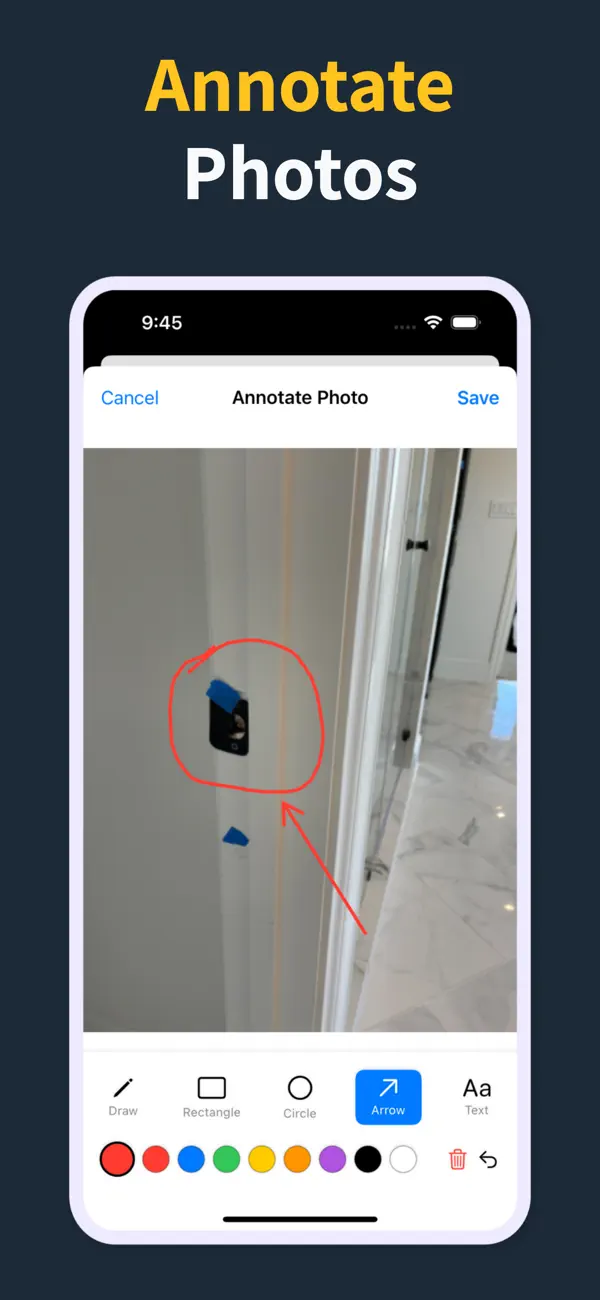
Punch List photo annotation tools
Photos

Mark exactly what needs work

Annotate photos before they go into the report, so subcontractors can see the exact defect and location.

  • Draw, rectangle, circle, arrow, and text tools
  • Undo/redo, selectable annotations, and color controls
  • Annotated images save back to the item
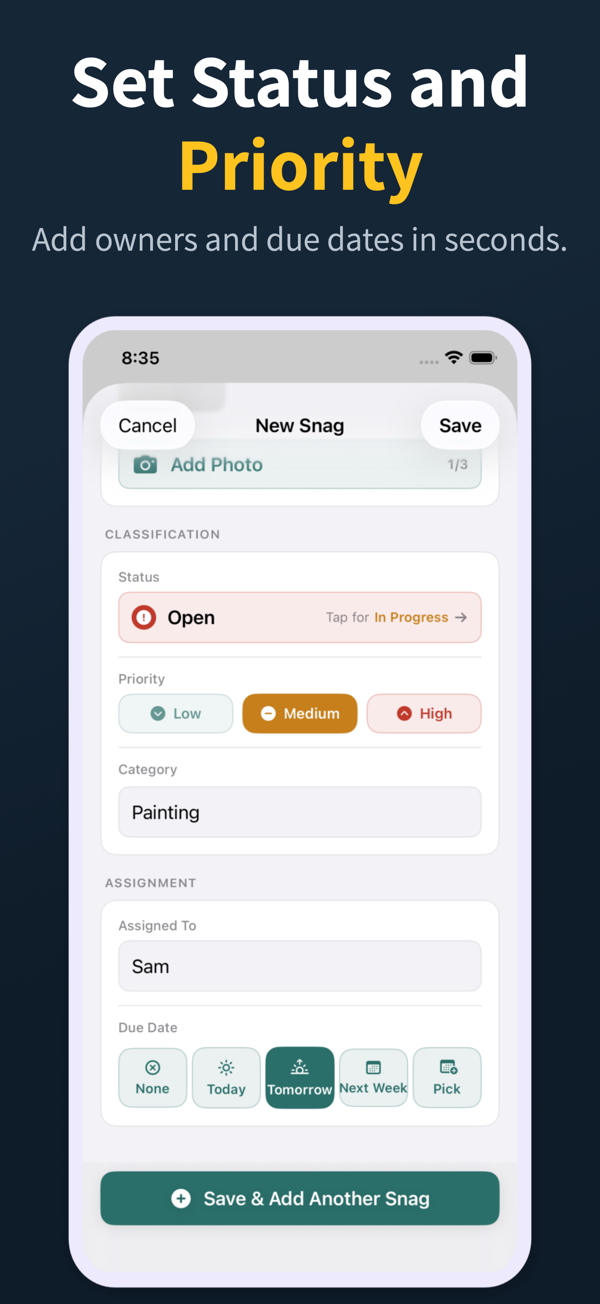
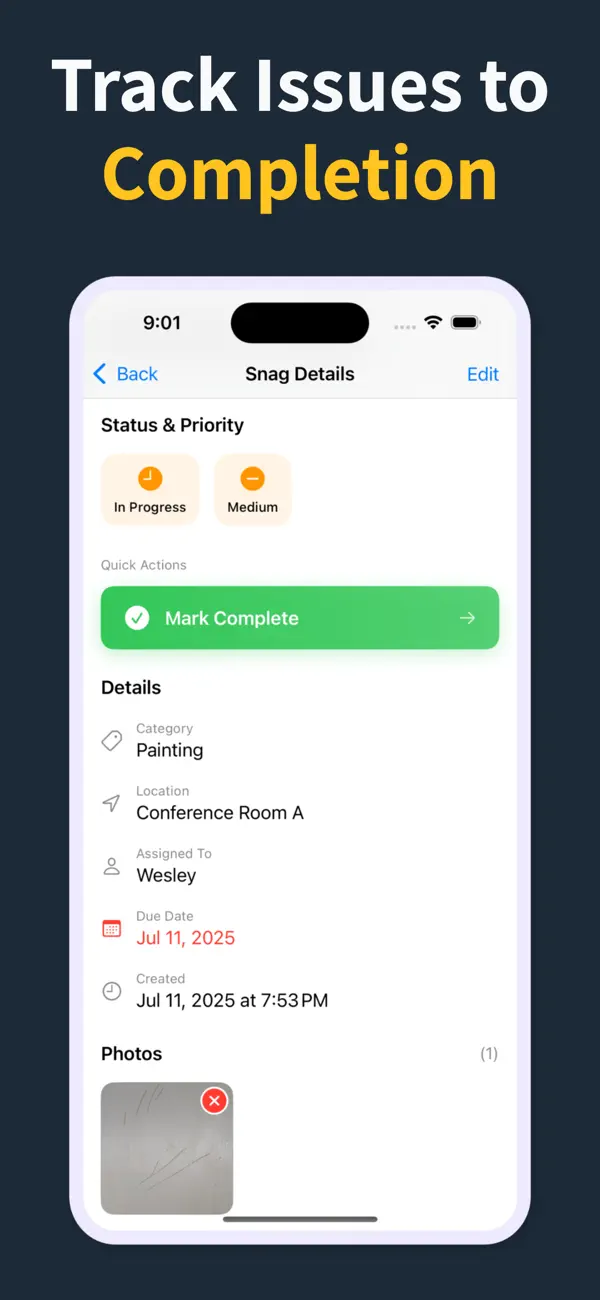
Punch List status, priority, assignment, and due date controls
Accountability

Assign, prioritize, and date the work

Each snag can carry status, priority, category, assignee, and due date so the list is actionable before handoff.

  • Open, in progress, and closed statuses
  • Low, medium, and high priority chips
  • Assignee suggestions and quick due-date choices
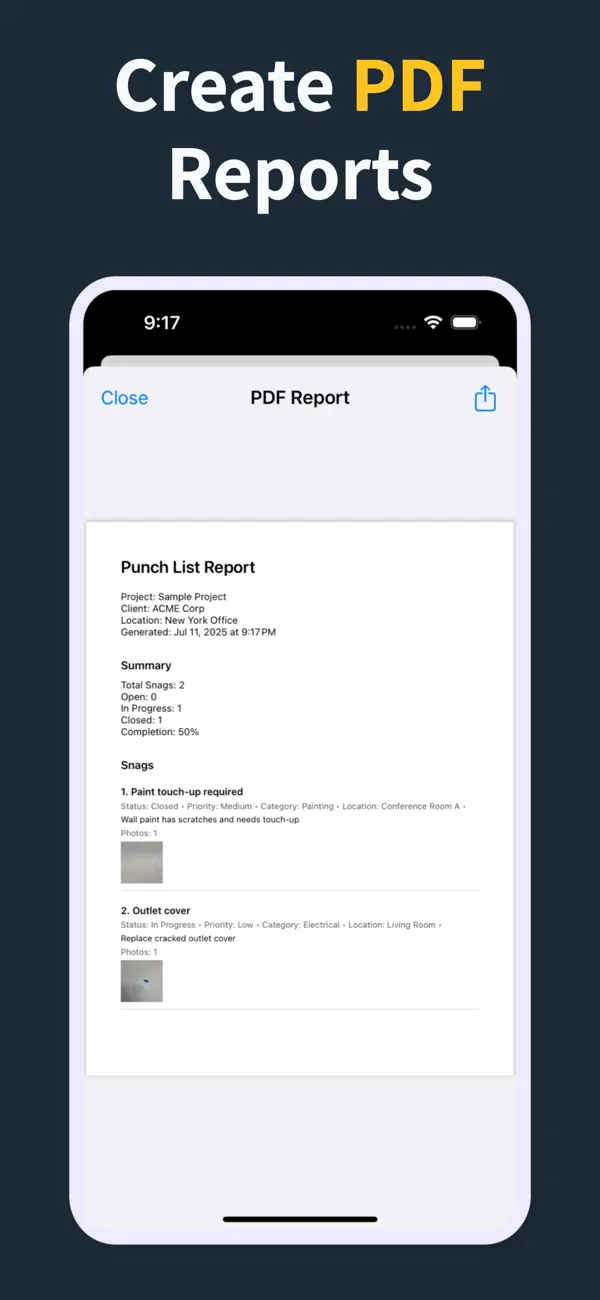
Punch List PDF report preview with photos and item details
Reports

Turn the list into a client-ready PDF on site

Generate a PDF with item numbers, status, priority, due dates, assignments, and inline photos right there in the field — so the report is done before you leave, not back at a laptop that night.

  • Build the report in the field, no laptop required
  • Pro unlocks clean PDFs and company branding
  • Share from the iOS share sheet before you drive off
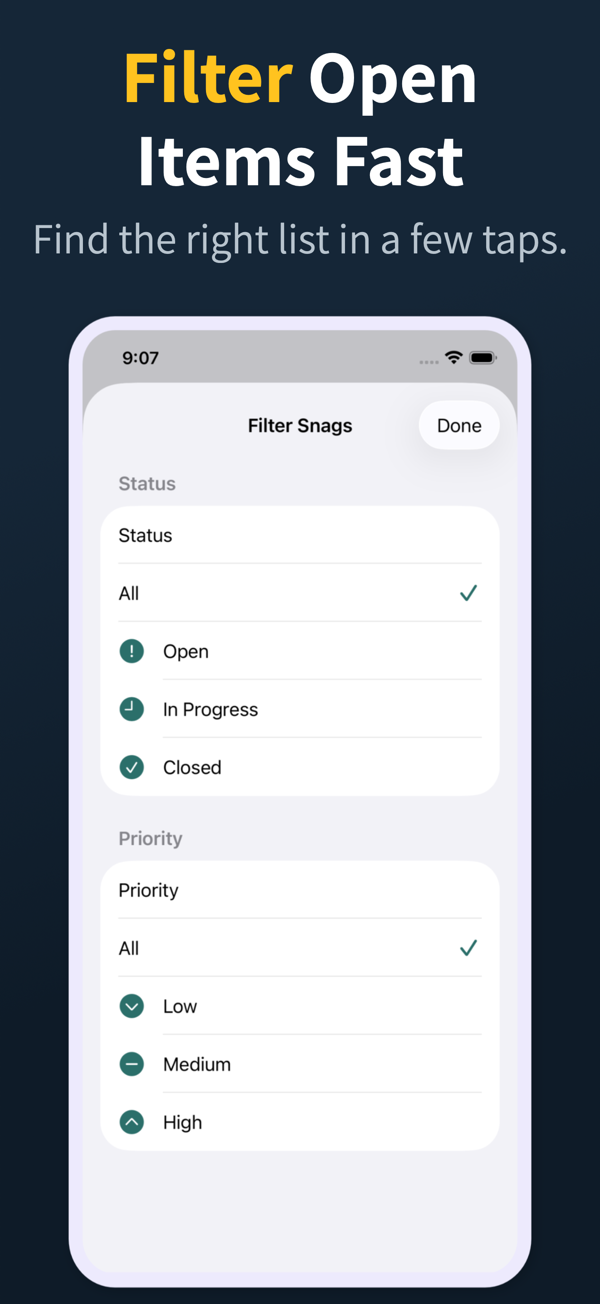
Punch List filter screen for open items and priority
Review

Find the right items fast

Search and filter snags by the fields teams actually use during closeout reviews.

  • Search title, description, location, category, and assignee
  • Filter by status, priority, category, and assignee
  • Grouped open, in-progress, and closed sections
Punch List project dashboard
Projects

Keep every site separated

Manage multiple projects with progress counts, project search, import, export, and iCloud sync for Pro workflows.

  • Project-level progress and open-item counts
  • Search across project name, client, and location
  • Pro unlocks project import/export and iCloud sync
04

Veelgestelde vragen

Welke functies moet een snagging-app hebben?

Offline vastleggen, een foto per gebrek, velden voor ruimte/locatie en onderaannemer, statusbeheer en een PDF-gebrekenrapport met huisstijl, een samenvatting en ingesloten foto's. Al het andere is optioneel.

Heb ik een betaalde snagging-app nodig?

Gebruik de scope die je echt nodig hebt. Een gerichte snagging-app als Punch List & Site Audit handelt de meeste inspecties van kopers en professionals af, terwijl Pro-abonnementen schone PDF's met huisstijl, import/export en iCloud-synchronisatie toevoegen.

Zijn snagging-apps nuttig voor woningkopers?

Ja. Een duidelijke, met foto's onderbouwde gebrekenlijst van een koper weegt zwaarder bij de ontwikkelaar dan alleen geschreven notities, en helpt ervoor te zorgen dat problemen worden hersteld voordat de garantietermijn van de nieuwbouw afloopt.

Kan een professionele snagging-inspecteur zijn iPhone gebruiken voor inspecties?

Ja. Een moderne snagging-app op de iPhone is sneller dan werken met klembord en camera, en maakt direct na de rondgang een deelbaar, professioneel ogend rapport.

Hoeveel gebreken zijn gebruikelijk bij een nieuwbouwwoning?

Van een paar dozijn tot enkele honderden, afhankelijk van de kwaliteit en omvang. Een goede app schaalt van kleine appartementen tot grote woningen zonder trager te worden naarmate de lijst groeit.

05

Gerelateerde gidsen

Beheer gebrekenlijsten en opleveringen vanaf je iPhone

Download Punch List & Site Audit on iOS. Capture snags with photos, mark up what needs fixing, and produce a clean PDF report right there in the field — no laptop, no typing the list back up at the office that night.

Download in de App Store
Scan om te downloaden