
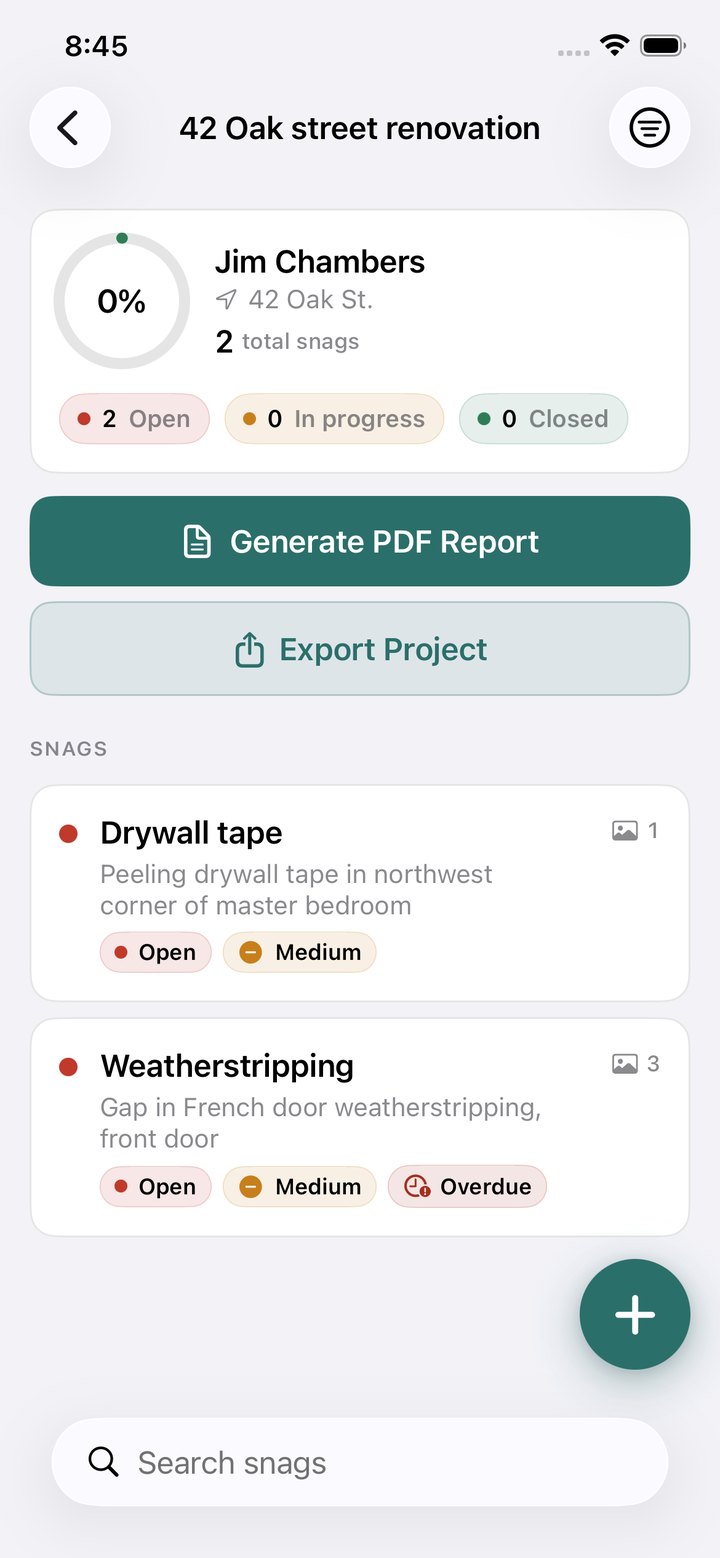
Everything in Pro, on every seat. Plus the whole team in sync.
- Team sync built for job sites
- Capture deficiencies fully offline in basements, shells and tank farms. Everything syncs to the rest of the crew the moment you're back in service, photos included.
- Separate devices, separate Apple IDs
- No shared iCloud accounts and no per-file invitations. Each employee signs in with a work email on their own iPhone or iPad and sees the company's projects.
- Roles and permissions
- Owners and admins manage members, seats and projects. Field crew capture, assign and close out. Simple by design, so nobody needs training.
- Your brand on every report
- One company letterhead, with logo, contact block and accent colour, on every PDF any team member generates. Never a watermark.
- Billing your accounting team will like
- Per-seat pricing with proper invoices, GST/HST and tax ID numbers and volume discounts. Add or remove seats at any time and the difference is prorated automatically.
- Secure team data
- Team data is encrypted in transit and at rest, with row-level access control so each company sees only its own projects.
Simple per-seat pricing
US$15USD per user / month, billed annually
or US$19 per user / month, billed monthly
Every seat includes all Pro features, team sync, roles and branded reports.
| Seats | Volume discount | Annual plan, per user / month | Monthly plan, per user / month |
|---|---|---|---|
| 1–9 | — | US$15.00 | US$19.00 |
| 10+ | −10% | US$13.50 | US$17.10 |
| 25+ | −15% | US$12.75 | US$16.15 |
| 50+ | −20% | US$12.00 | US$15.20 |
| 100+ | −25% | US$11.25 | US$14.25 |
Prices in US dollars, excluding GST/HST and other taxes. No seat minimum and no setup fee. Monthly plans can be cancelled at any time; annual plans renew yearly. Discounts apply automatically at checkout.
| Tool | Published list price per user / month |
|---|---|
| PunchList Business | $15 |
| Fieldwire Pro | $39 |
| PlanRadar | ~$35 |
| Autodesk Build | $117+ |
Competitor figures are published 2025–2026 list prices on annual billing, shown for comparison only.
Subscribe in about a minute
Choose a plan, enter your team's billing code and billing email, and finish on Stripe's secure checkout. You set the number of seats at checkout and can change it at any time afterwards.
Up and running in three steps
-
Install and create your team
Install Punch List on iPhone or iPad, open Settings › Team, sign in with your work email and name your team. A 30-day free trial for up to 5 people starts on the spot. No card, nothing charged.
-
Invite your crew
Share the team's invite code. Every team project syncs between everyone, photos included, and keeps working offline on site. Your team billing code appears under Settings › Team.
-
Subscribe when you're ready
Enter the billing code and your billing email above, choose the number of seats and pay on Stripe's secure checkout. The trial never turns into a paid plan by itself; the first charge is the one you make at checkout.
Want to try the app on your own first? Download it free: every feature works, and PDF reports carry a watermark until you subscribe to Pro or Business.
The facts your IT and finance teams will ask for
- Encryption
- Team data is encrypted in transit (TLS) and at rest.
- Isolation
- Row-level access control on every table. A company's members can only ever read their own organization's projects and photos.
- Sign-in
- Passwordless one-time codes sent to work email addresses. We never store passwords.
- Payments
- Handled by Stripe, a PCI DSS Level 1 service provider. Card numbers never touch our servers.
- Invoicing
- Stripe invoices carry your company name, address and GST/HST number or VAT / tax ID. Purchase-order invoicing is available for 25 seats or more.
- Your data
- Export any project as a PDF report or a project file at any time. Members and organizations can be deleted on request.
The details
Do we need a sales call or a contract?
No. Subscribe on this page and your team is active as soon as Stripe confirms the payment. Monthly plans can be cancelled at any time; annual plans are invoiced once a year. Larger companies that need a quote or purchase-order invoicing can email us.
How does my team sign in?
With a work email and a one-time 6-digit code. No password, no Apple ID, no iCloud. Each person signs in on their own iPhone or iPad under Settings › Team and sees the company's projects.
Can we try it before we pay?
Yes. Creating a team in the app starts a 30-day free trial for up to 5 people. No card is required and nothing is charged during the trial. You can also download the app free and use it on your own; PDF reports carry a watermark until you subscribe.
What happens when the trial ends?
Team projects become read-only until the team subscribes. Nothing is deleted: every deficiency and photo stays put, and reports and exports keep working. Everything resumes the moment the subscription is confirmed.
When are we charged, and how do we cancel?
You're charged only when the team owner subscribes on this page: the first charge is at checkout, and the plan then renews monthly or yearly depending on what you chose. The trial doesn't convert into a paid plan by itself, so there's nothing to cancel to avoid a charge. A subscription can be cancelled anytime in the customer portal and ends at the close of the paid period.
Can we add or remove seats later?
Yes. Change the seat count in the customer portal at any time. Increases are charged pro rata for the rest of the billing period and decreases are credited.
How does offline work with a team?
Every device keeps a full local copy. Capture and edit with zero connectivity for days; changes merge automatically when you're back online, photos included.
Does the solo app change?
No. The App Store app and the Pro subscription stay exactly as they are. Business is a separate plan for companies that need shared projects across several people.
Larger companies and purchase orders: email us and we invoice directly for 25 seats or more.
Manage your subscription
Add or remove seats, switch between monthly and annual billing, update billing details and download invoices in the Stripe customer portal.
The portal is temporarily unavailable. Email us and we'll change seats or send invoices by hand.
Put your whole crew on the same page.
Subscribe today, or start a free 30-day trial and decide later.